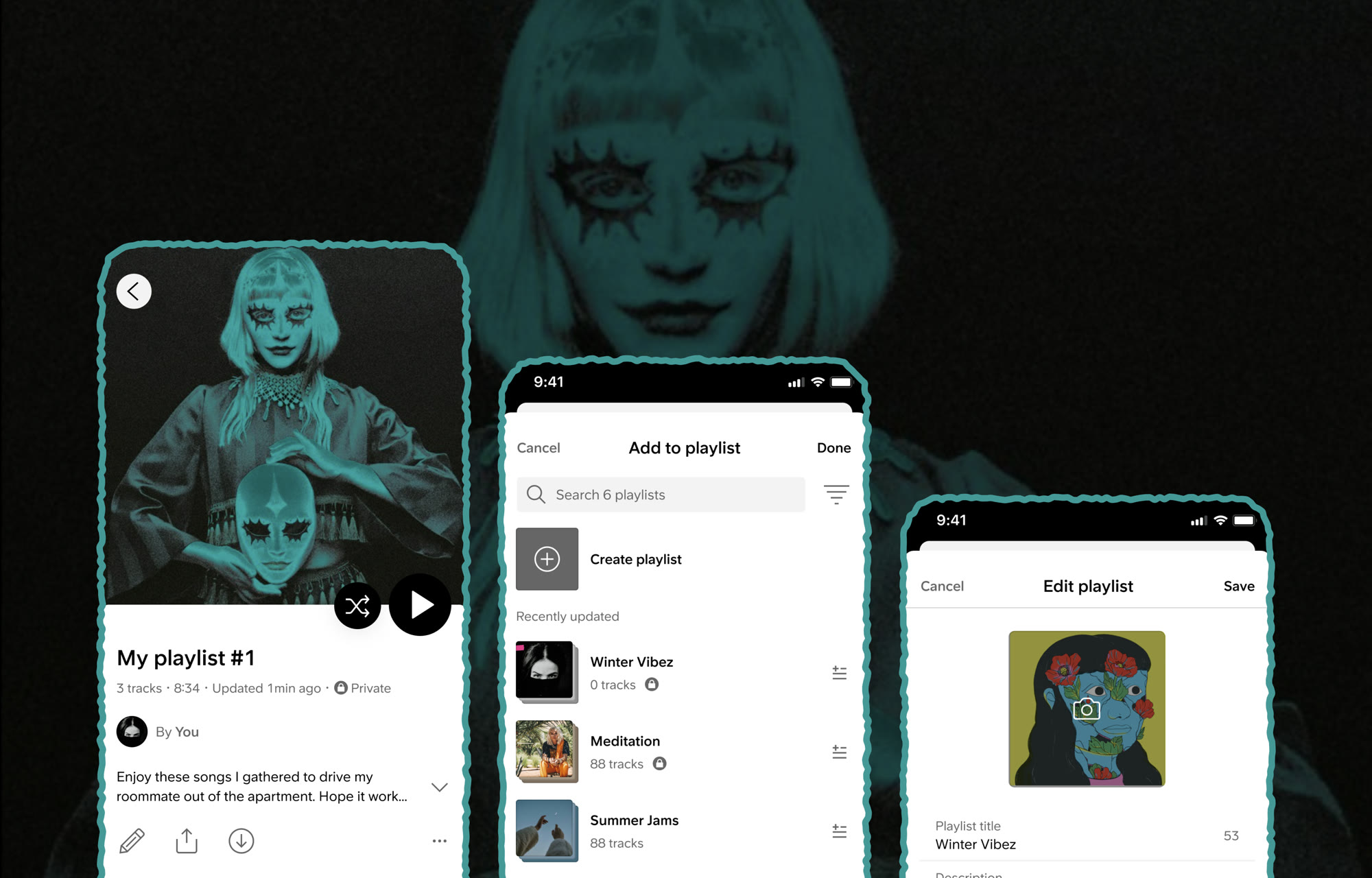
The first chapter in a longer arc toward a compelling social music experience on SoundCloud, built around the playlist format. The goal here is to provide the fundamentals for playlist creation, addition, and editing on mobile.
Problem
Most SoundCloud users face challenges creating, updating, and promoting playlists on mobile. They want easier creation, more customization, and clearer feedback on their actions.
Goal
Make SoundCloud a frictionless vehicle for daily music re-consumption, improve stickiness by removing the friction blocking the platform's most active listeners from the playlist format.
- 52 → 55% MAU owning >1 playlist
- 5.5 → 10% MAU creating playlists
- 10 → 20% MAU editing playlists
My Role
Lead Product Designer on the Listeners org. Defined the vision, built the framework, and broke it down into the Playlist Basics project, leading design end-to-end and partnering with UXR on the research.
-
Final flows
What shipped: Create, Add to playlist, and Edit playlist on mobile. Play the prototype to view it. Keep scrolling to see how we got here.
-
Create playlist -
Add to playlist -
Edit playlist
-
-
Opportunity
Most of our users face challenges creating and promoting playlists on SoundCloud. They need improvements to how they create and update playlists, and they want more customization.
Besides self-listening, with playlists users need to show their taste, recommend music to others (share with friends and followers), and support artists they like.
-
Methodology
We surveyed 2,009 SoundCloud users in December 2020, a 7-minute online survey targeting active listeners. Guardrails kept the focus on people who listen, not people who release.
- 01
n = 2,009 SoundCloud users completed the survey.
- 02
Age 18+ All respondents were adults.
- 03
Active in 30 days Had played a track on SoundCloud in the last month.
- 04
2+ public playlists Already engaged with the playlist format.
- 05
Fewer than 6 uploads Listeners rather than artists, keeps the audience tight.
- 01
-
Challenges
54% of respondents faced challenges creating or editing playlists. The top difficulties: finding the content they wanted to add, and using the playlist creation interface itself. 12% worried about what others would think of their playlists.
“Adding one song (or multiple) to multiple playlists gets annoying.”
— Survey respondent -
Desired Improvements
Almost 9 out of 10 users wanted improvements to how they create and update playlists. Top among them: greater customization on mobile, followed by automated track suggestions for their playlist.
“Able to change the order of the list, drag and drop songs.”
— Survey respondent -
Status Quo: Create
There is a lack of discoverability and intuitiveness in creating new playlists.
- 01
Users can't create a playlist easily, the entry point is hidden.
- 02
Users can't search for playlists they own.
- 03
Users can't filter or sort their playlist library.
“I find it difficult to find some playlists, I wish there was a search option.”
— Survey respondent - 01
-
Status Quo: Add to playlist
Current experience in adding tracks to an existing playlist is too difficult and has high friction.
Users can't add to multiple playlists at once, the tiles take too much space, there's no search or filter, and the playlist order doesn't update.
Visual feedback after adding a track is missing or slow, users aren't sure their action registered. An extra step or animation to visualise the result would close that loop.
“There should be an option for how we want the songs to be sorted.”
— Survey respondent -
Status Quo: Edit playlist
Users currently can't edit playlist title, artwork, description and tags on mobile.
The Edit button is hidden behind the more menu, and the more menu offers no value in this view during editing, it just adds friction.
“Ability to change name after creation.”
— Survey respondent -
Target Audience
Data science pinpointed the most active playlist creators by listening time and social usage. UXR followed with ethnographic research to surface motivations and frustrations the survey couldn't reach, distilling them into Discovery Dex, our Power Listener persona. Designing for Dex drives the highest-engagement segment, with a halo for passive listeners.
The Passionate Creator
Representing "Power Listener" segment
- GO+ Account
- 3+ Years
- Late Gen Z
“I'm one of those annoying people who isn't going to listen to an artist just because they're really popular. To me, if they're really popular, they're probably not thaaat good of an artist. I like to be drawn to a person's music. There's so many mainstream artists.”
-
Goal
- Individualistic Curator — Finding the most interesting, newest, dopest tracks to not only enrich himself but to share with others.
- Ultimate Critic — He is perceived as the music culture point-of-reference in his direct and larger social circles.
- Talent Scout — Being a definite part of the growth and fame of the non-mainstream artists he believes in.
-
Pain Points
- Bad Quality — Frustrated when listening to low quality tracks.
- Loss of Connection — Feels less connected when small artists become popular because he feels they're too big to care about OG fans. This drives him to find new artists frequently.
- Despise Mercantilism — Dislikes ads and doesn't want to navigate through them while using a music platform.
-
Behaviors
- Exploratorive Mindset — Explores experimental playlists, browses niche genres, follows unknown new artists. Spends just as much time listening as he goes down the rabbit hole.
- Public Sharing — Curates and shares extensive playlists. May upload his own mixes. Enjoys sharing across any medium.
- Deep Expertise — Has a voracious appetite for and deep knowledge of modern music culture.
- Professional Networker — Follows artists and labels on DSPs and social media. Takes pride in connecting with them as a colleague.
-
Needs
- Thirst for Knowledge — Discover new artists and content organically through manual exploration, linking artists and tracks to new content.
- Easy Sharing — Always needs an easy way to share music on social platforms.
- Peer Mingling — Has an unsatisfied need to get closer and contact other artists on a personal level.
-
Sprint structure
Two-week sprint cadence, week one for divergent ideation and a realistic prototype, week two for refinement, testing, and insight clustering.
-
Competitive Research
Scanned competitors across Create, Add, and Edit to identify gaps and patterns worth borrowing. Most, Spotify included, don't support adding a track to multiple playlists at once or give visual feedback after the action.
-
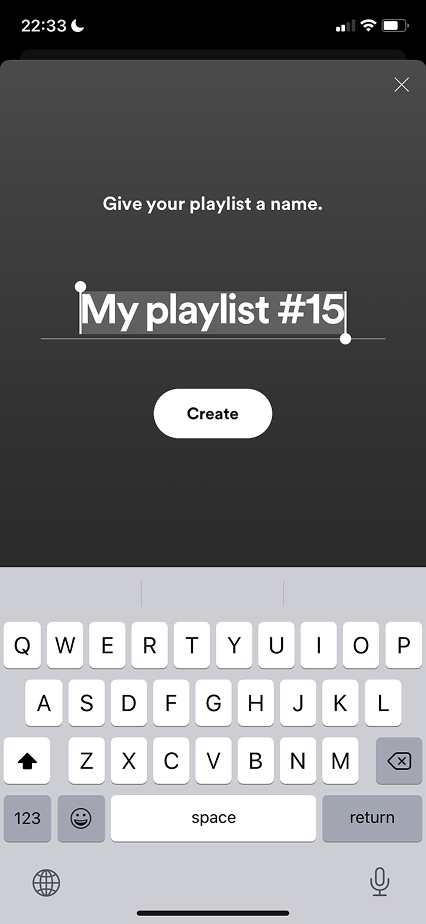
Spotify Pro: Auto playlist count in title reduces cognitive load. The default is pre-selected so renaming is fast. -
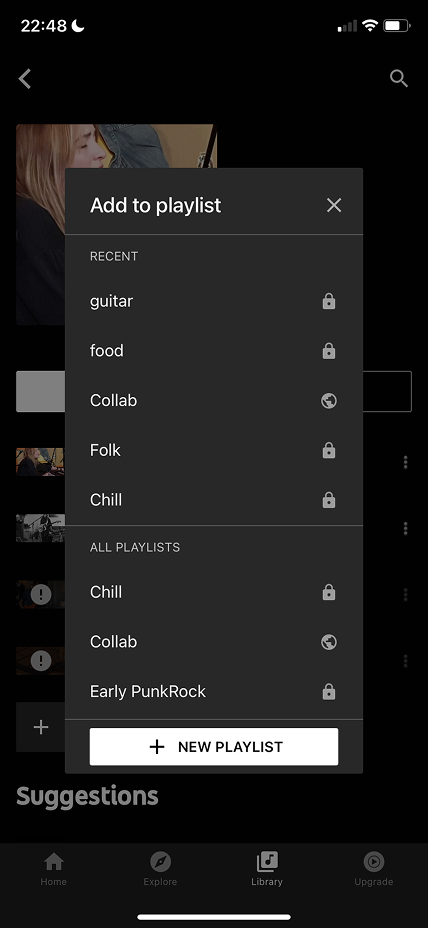
YouTube Music Cons: Can't search or filter. No metadata. Visually not appealing. -
Apple Music Pro: Smooth in-place editing. Felt light and fast. -
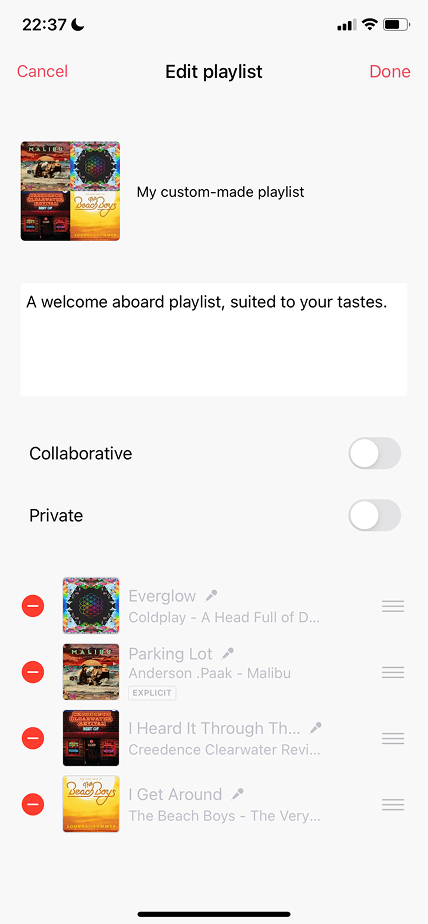
Deezer Q. How often do users edit details vs. their track list?
-
-
Proposal: Create playlist
How might we introduce an easy and intuitive way for Dex to create a playlist so they engage more, and help new users create a playlist in 10 seconds so they start using playlists more often.
Re-used the existing playlist list component for visual harmony, the Create playlist entry sits at the top of the same list. Tapping it opens a Create playlist sheet (title + public toggle), saving lands on an empty detail page that prompts "Let's find some tracks for your playlist".
-
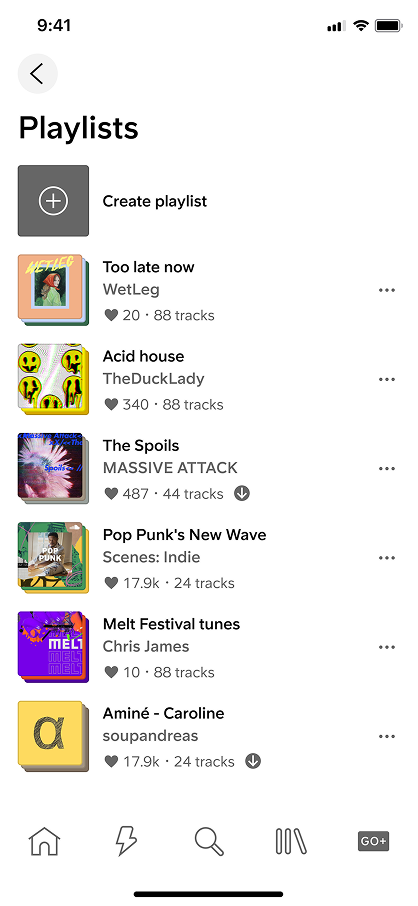
Final playlist -
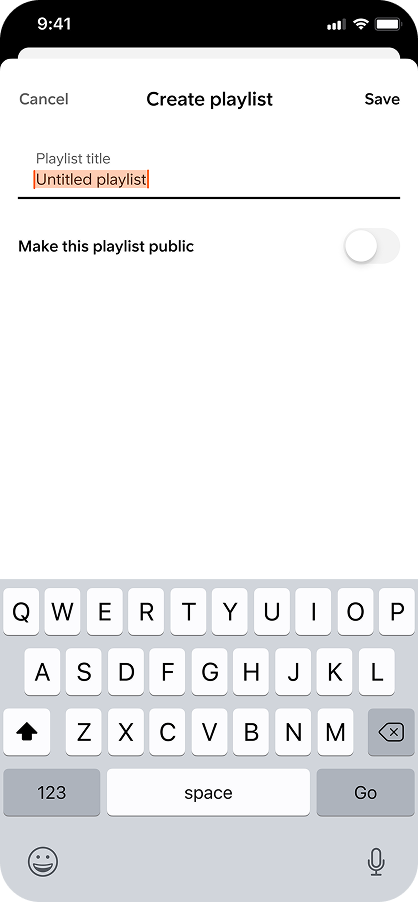
Create playlist sheet -
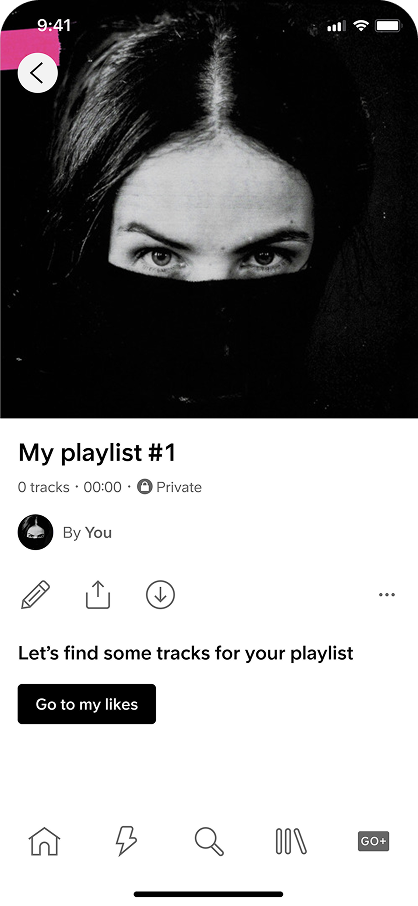
Empty detail → add tracks
-
-
Proposal: Add to playlist
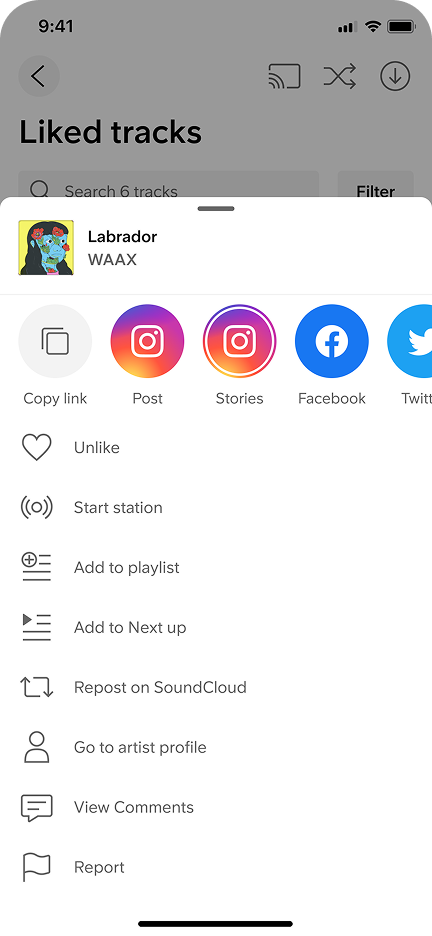
How might we make it easier for Dex to sort and filter their playlists, and enable adding tracks to multiple playlists at the same time for a smooth, fast experience.
- 01
Multi-select Users can add a track to multiple playlists in a single sheet, checkmarks accumulate, no exit-and-retry.
- 02
Search + sort Users can search their playlist list and sort it.
- 03
Auto-add on create Creating a new playlist from the Add sheet automatically adds the current track to it, no separate second action.
-
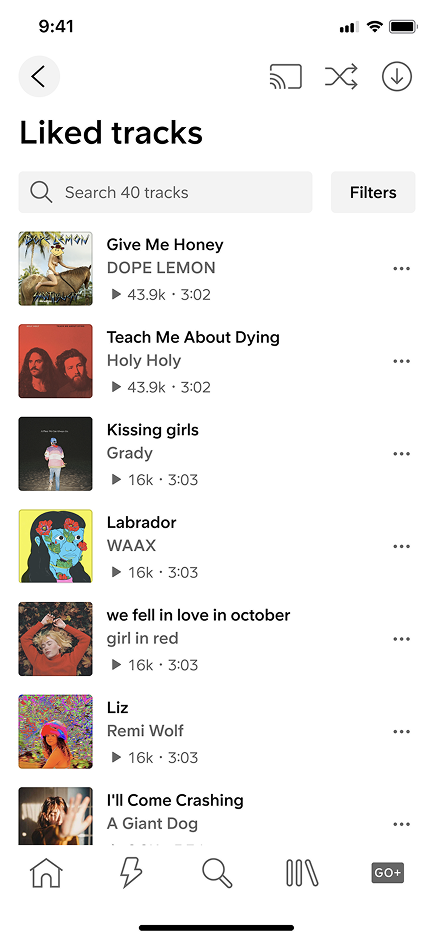
-
-
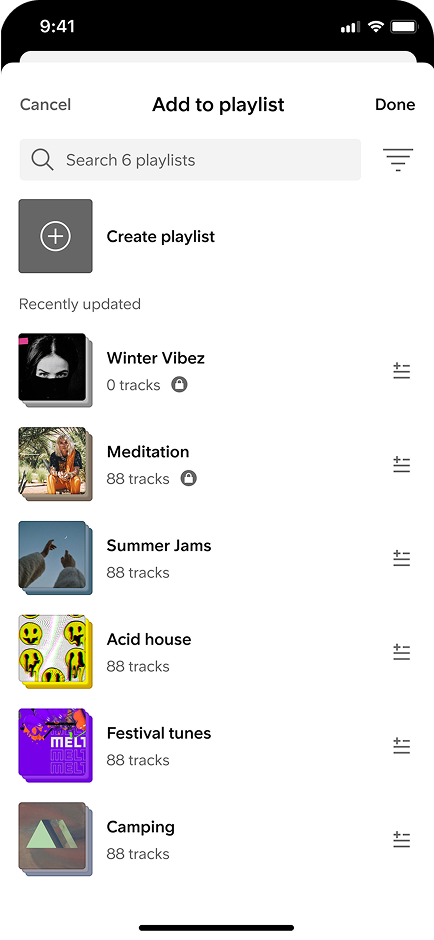
Users can add a track to multiple playlists and remove -
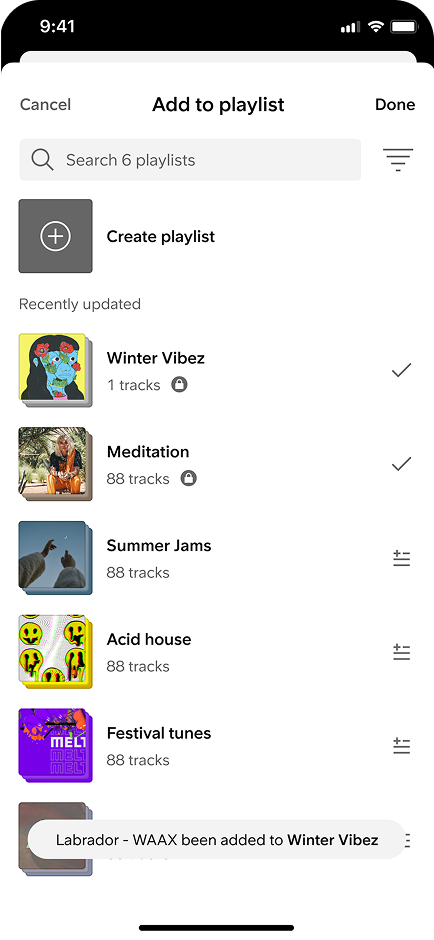
Creating a new playlist automatically adds it to the list -
Is having this step necessary to create a new playlist in the collection flow - Removing this step will make the flow faster -
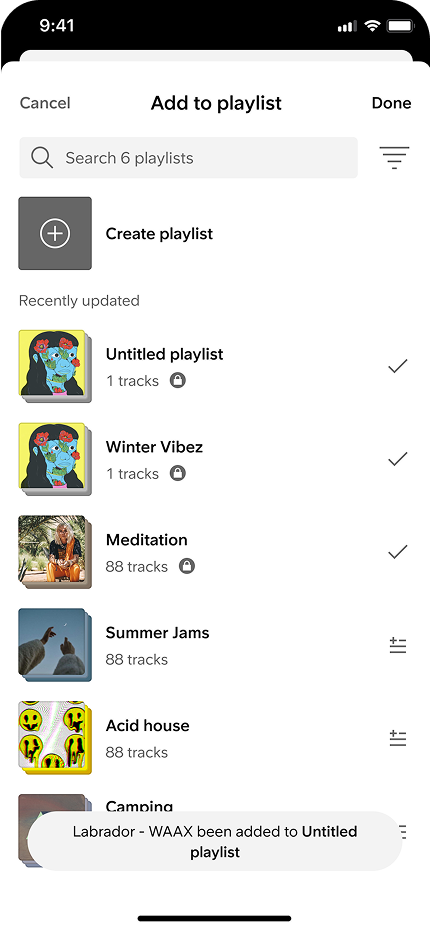
Users can search and sort their list
- 01
-
Proposal: Edit playlist + tags
How might we enable Dex to edit their playlists' artwork, title, and description to improve usability, and allow tagging playlists so they become discoverable.
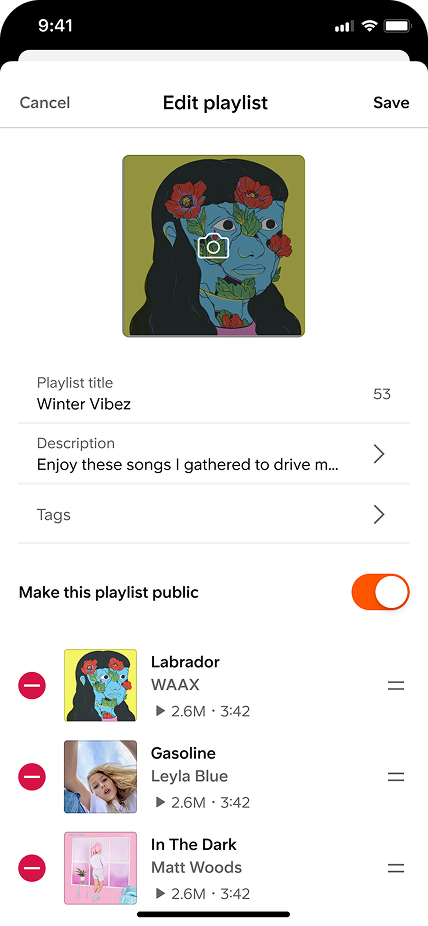
Two directions explored: editing everything on one page, or splitting into separate tabs that prioritise track edits over details.
- ALL IN ONE PAGE EDITING
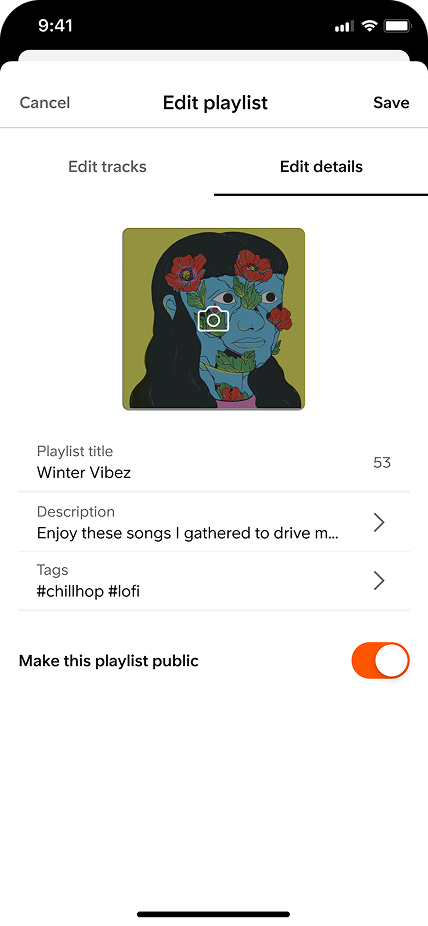
Users can now upload a playlist artwork, give it a title, add a description and a tag/genre -
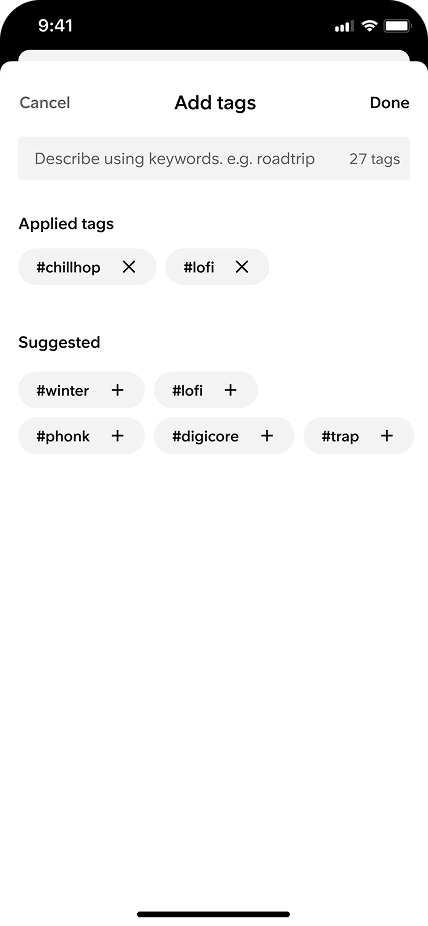
Suggested tags are based off users library or tracks in playlist -
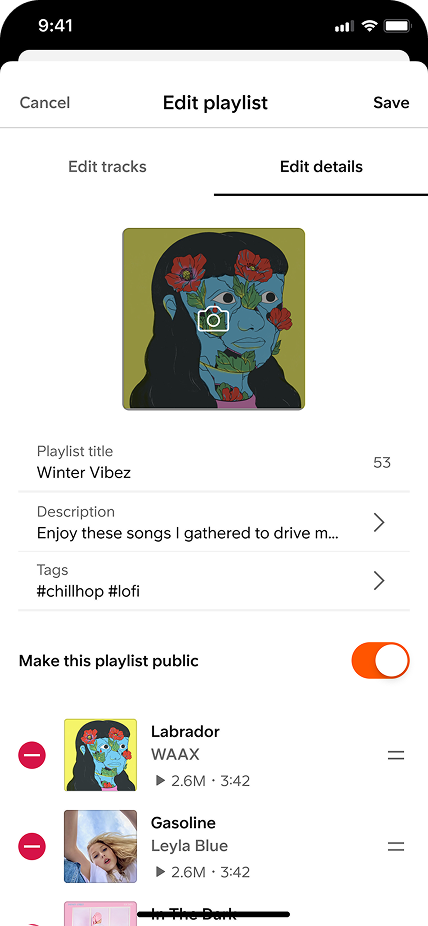
- SPLITTING EDITING TRACKS AND DETAILS
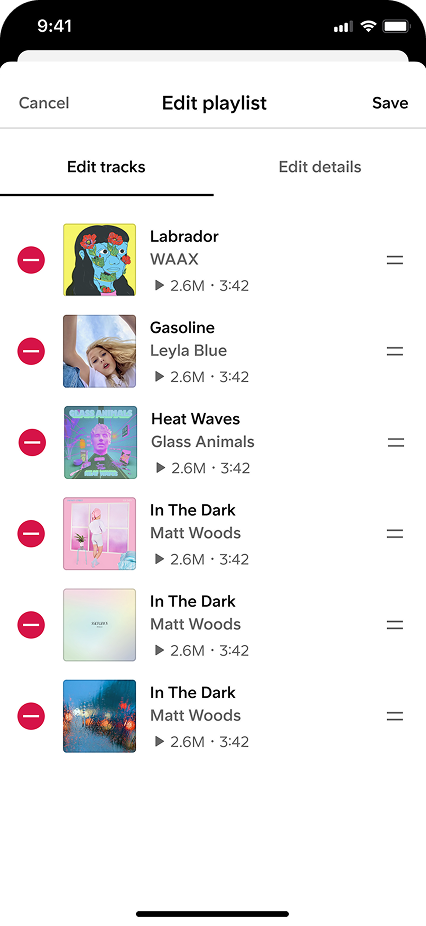
Second direction - Prioritizing editing tracks over details on the assumption that users would edit their tracks list more often than their details -
- ALL IN ONE PAGE EDITING
-
Validate
Usability testing covered 15+ participants split across extreme (5+ playlists) and non-extreme playlist users, SoundCloud users and non-SoundCloud users, moderated and unmoderated sessions.
- 01
5+ playlist users tested with so we could identify key playlist experiences we might have missed (search, filtering, etc).
- 02
Fewer-playlist users tested with so we could evaluate how easy it was to create from cold.
- 03
Method Moderated + unmoderated, wider behavioural signal alongside think-aloud insight.
- 01
-
Insights: Create
Users found it easy to create a playlist. Overall, users create their own playlists to have more control on the type of music they listen to as a safe bet or the mood they're in.
Users mentioned different situations in which they create new playlists, planning a collection for a special occasion, or being hooked by a specific track that doesn't fit any existing playlist. Having a Create playlist button in Library under Playlists was expected by all participants, and all users completed the task successfully.
“It's very easy, it took me no effort to create a playlist. It was quite clear.”
— Usability test participant -
Insights: Add to playlist
Overall it was very easy for users to add a track to a playlist from the more menu. It's common for users to add a track to more than one playlist, songs often suit more than one category or mood.
- 01
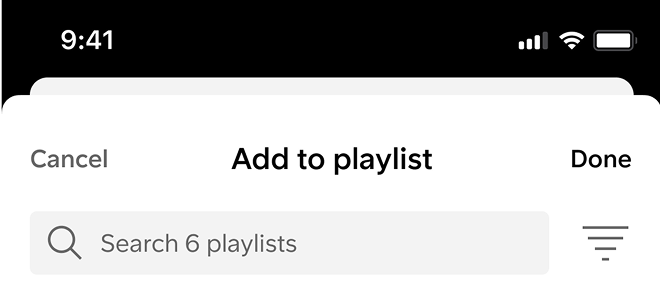
Sort icon was unclear Users weren't sure what it represented, guessed it might be a sort or filter action.
- 02
Metadata appreciated Users liked seeing the number of tracks per playlist and whether it was public or private. They asked for duration too, for building lengthy playlists for events.
“There could be a button that says add songs with suggestions from SC.”
— Usability test participant - 01
-
Insights: Edit playlist
All users understood tags would help others find their playlist. Users typically added tags using either genres OR moods, the suggested tags system needs to surface both, so users don't assume they should just be adding genres.
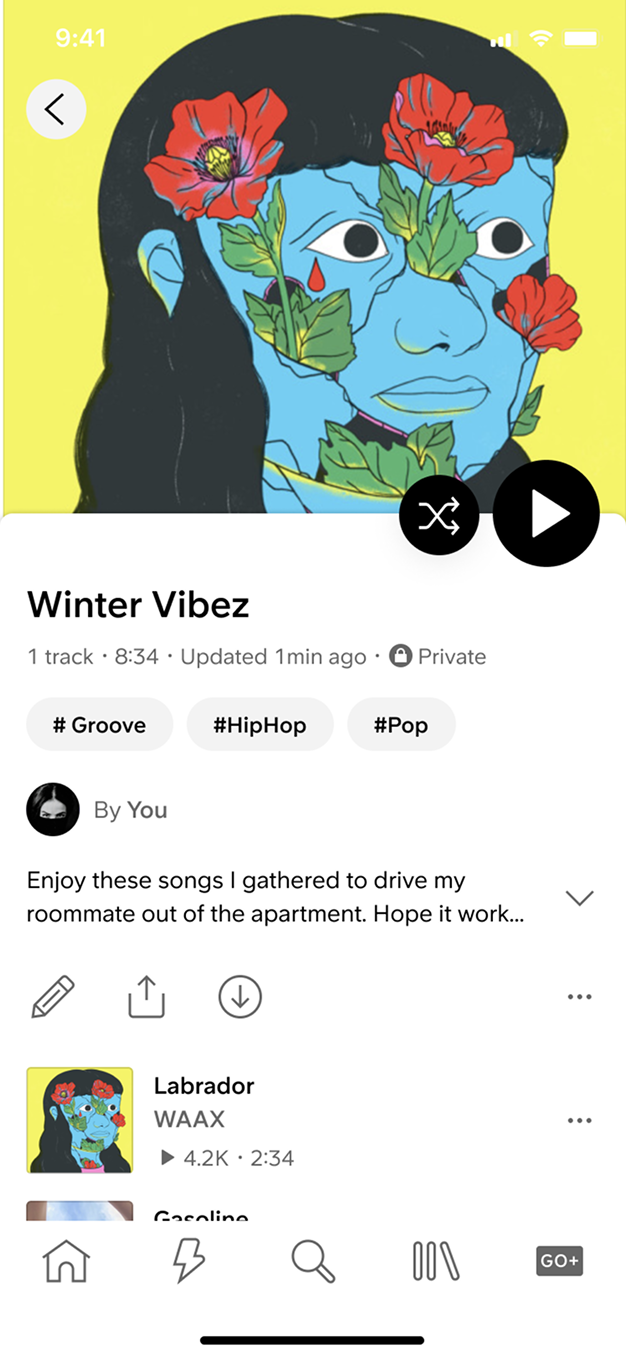
The big surprise: users misunderstood tags as filters. The placement created the impression that tags would filter out music from the playlist itself, not act as discovery affordances for others.
“I expected to type a tag, not a premade list of genres. I would prefer to type a tag myself.”
— Usability test participant -
Second Iteration
Iterations from the testing round, three focused changes drawn straight from the insights, paired before and after so the shift is visible.
- 01
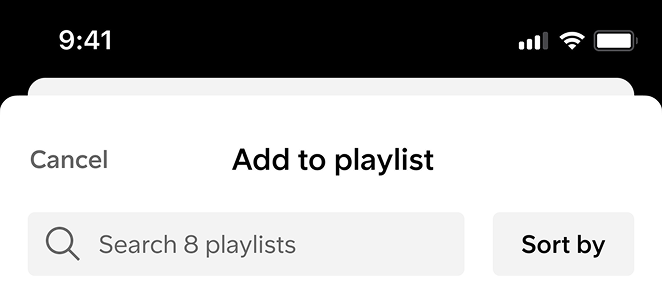
Sort by, not sort icon Moved from an icon approach to a copy button, "Sort by" reads correctly on first glance.
- 02
Tags under metadata Placed tags under playlist metadata to avoid the misunderstanding that they're filters, and to make it easier to read the vibe/genre of a playlist by scanning these tags.
- 03
Duration deferred Technically difficult to implement reliably across the catalog, queued for later.
-
Before · sort icon -
After · "Sort by" copy -
Before · tags below description -
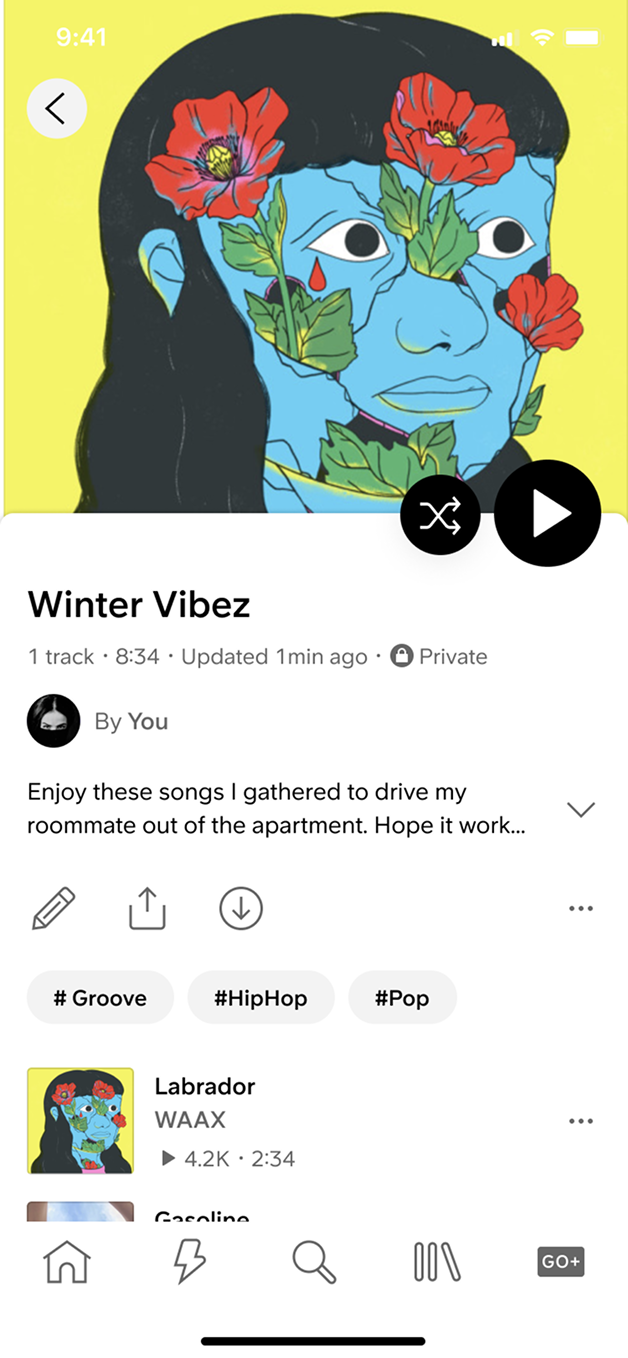
After · tags under metadata -
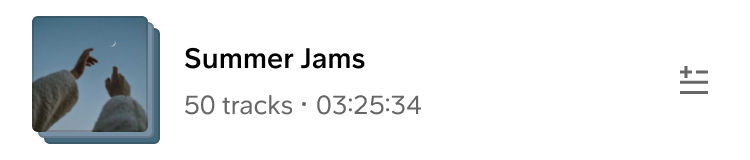
Duration · deferred
- 01
-
Final prototype
Three flows shipped to Android, Create playlist, Add to playlist, and Edit playlist, after iteration on insights from the testing round.
-
Create playlist -
Add to playlist -
Edit playlist
-
-
Build
Android shipped Create playlist and Add to playlist first. iOS Create playlist followed into development, with iOS Edit playlist queued behind it. Impact is still TBD*.
Two issues surfaced in Playstore feedback that the team had missed: a duplicate "Untitled playlist" bug in the create-during-add-to-playlist flow (2 users), and laggy visual feedback when adding tracks (1 user). We patched both, and reintroduced the create-playlist title sheet as a stopgap until edit-on-mobile shipped.
The takeaway: we should have built each story in pairs, add title with edit title, show genre with add genre. Shipping create features without their matching edit support recreated the exact friction users were trying to escape.
“They removed the ability to change the name of the playlist, I already have about 5 Untitled Playlist playlists.”
— Playstore user -
Constraints & Reflections
Three real-world constraints shaped how this project ran, and how I would scope the next one.
- 01
Working without dedicated engineering for parts of the process meant iterating multiple times in design alone, waiting for an engineering window, and over-documenting every decision so nothing got lost when implementation finally picked back up.
- 02
Executing the end of the project without a PM I filled the PM gap myself in the final stretch, leaning on the structured process and the documentation to keep stakeholders aligned without a dedicated voice in the room.
- 03
Splitting Edit into two milestones Tags added complexity that risked delaying the core editing flow. We shipped edit-without-tags first and queued tags as a separate milestone, sometimes the right call is to ship a smaller win sooner.
- 01
-
Next Steps
Playlist Basics was the first chapter in a longer arc toward a social music experience built on the playlist format. The next set of bets follows directly from the research signals and the Playstore feedback loop.
The follow-up project, an Add music CTA in the empty playlist state that hands users a Recommended tracks sheet, is already on the next roadmap, surfacing the deeper layers below the basics.
- 01
Playlist track management Deeper editing, reorder, bulk operations, smarter defaults.
- 02
Social engagement Comments on playlists, so curation becomes a conversation.
- 03
Collaborative playlists Multi-creator playlists for friends, groups, communities.
- 04
Smart playlist in 10 seconds Automatic track suggestions, the #2 survey ask, baked into the create flow.
- 05
Similar taste Discovery driven by playlist tags and listener behaviour, Dex finding Dex.
-
Add music -
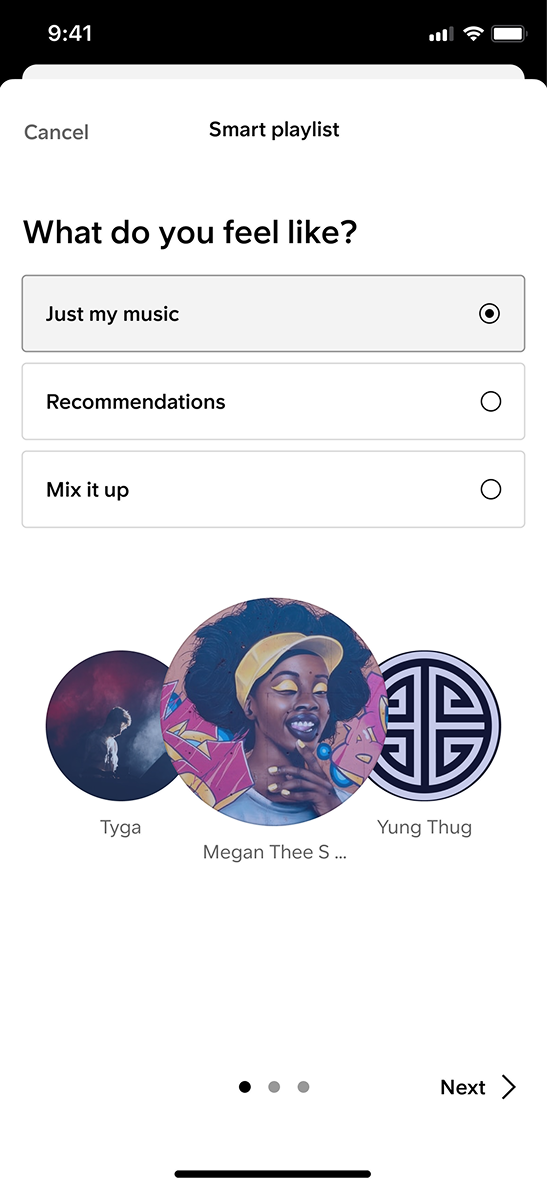
Smart playlist in 10s -
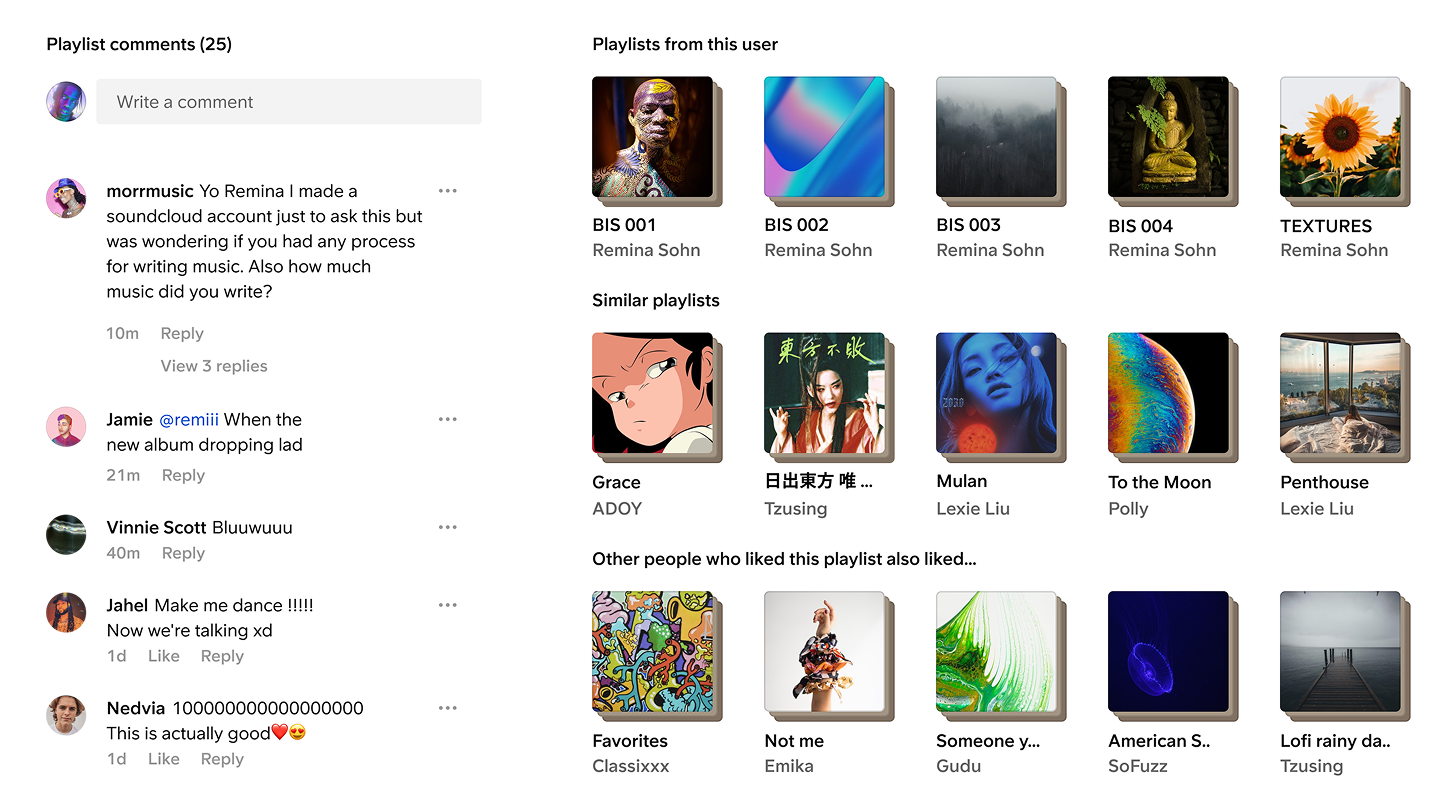
Social engagement · similar taste
- 01